 Swapp AI
Turning an architect's request into changes they can see, check and approve.
Swapp is an AI assistant that works directly on architectural plans. An architect describes a change in plain language, and the assistant shows where it lands on the plan, explains the issues it finds and points to related changes. Anything that matters waits for the architect's approval. As the sole product designer, I led the design end to end.
The problem
One moved wall can quietly break the rules around it.
On a plan, nothing changes alone. Move a wall, a corridor or an opening, and the dimensions, accessibility rules and annotations connected to it change too.
Architects checked those connections by hand, across drawings and regulations. A command box that just executes requests would have made mistakes faster. The real job was to support a decision: show the issue with enough context to judge it.
Research
Architects in the room every day, not once a quarter.
The in-house architects weren't occasional test participants. They were daily collaborators and the domain experts on every decision. Their feedback showed where the AI needed more context, when it had to explain itself, and which decisions needed an explicit yes.
- 01Context comes firstAn answer that ignored the plan on screen wasn't trusted, however good it sounded.
- 02Show the reading, then actArchitects wanted to see what the AI understood before anything changed.
- 03Some calls stay humanChanges with real impact needed a clear moment of approval.
Design principles
Four rules for an assistant professionals can trust
- 01Start with the architect's languageA request in their own words, with the plan visible, not a command syntax to learn.
- 02Make interpretation visibleWhat the AI understood is shown on the plan before it does anything.
- 03Clarify only when neededQuestions come when something is unclear or risky, not at every step.
- 04Turn every recommendation into a decisionEach suggestion ends in a clear choice: approve, ask for another direction, or keep it as is.
The approach
The system came before the screens.
Before designing any interface, I mapped how intent, the AI's interpretation, validation and human approval connect. That map became the structure of the conversation, and room for the product to grow.
- 01IntentThe architect describes the change
- 02InterpretThe AI shows what it understood, on the plan
- ValidateDimensions, rules and annotations are checked
- 03DecideApprove, redirect or keep as is
- Wider impactSimilar places, surfaced for review
01 · Start with intent
A request in the architect's own words
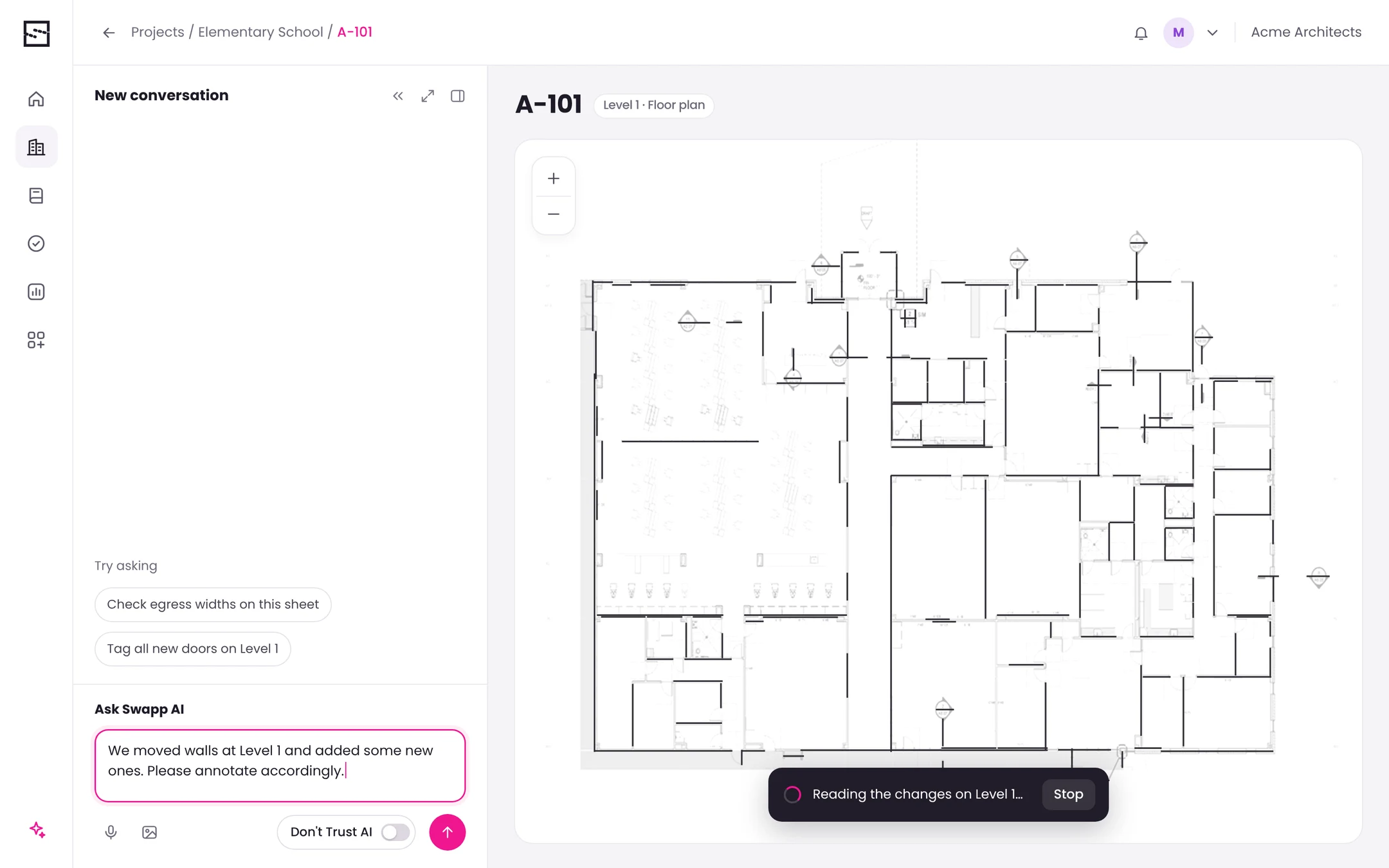
The conversation sits next to the plan it's about. The architect describes the change, and the plan shows right away that the request was received and is being worked on.
 1234
- 1Plain languageNo commands to learn. The request reads the way an architect would say it to a colleague.
- 2Voice and images tooA request can be spoken, or come with a sketch or a photo of a markup.
- 3How much the AI decides alone“Don't Trust AI” is a switch. On, the assistant asks before every decision. Off, it handles routine decisions on its own.
- 4Received, and stoppableA processing state on the plan confirms the request was understood, with a way to stop it.
02 · Connect the explanation to the plan
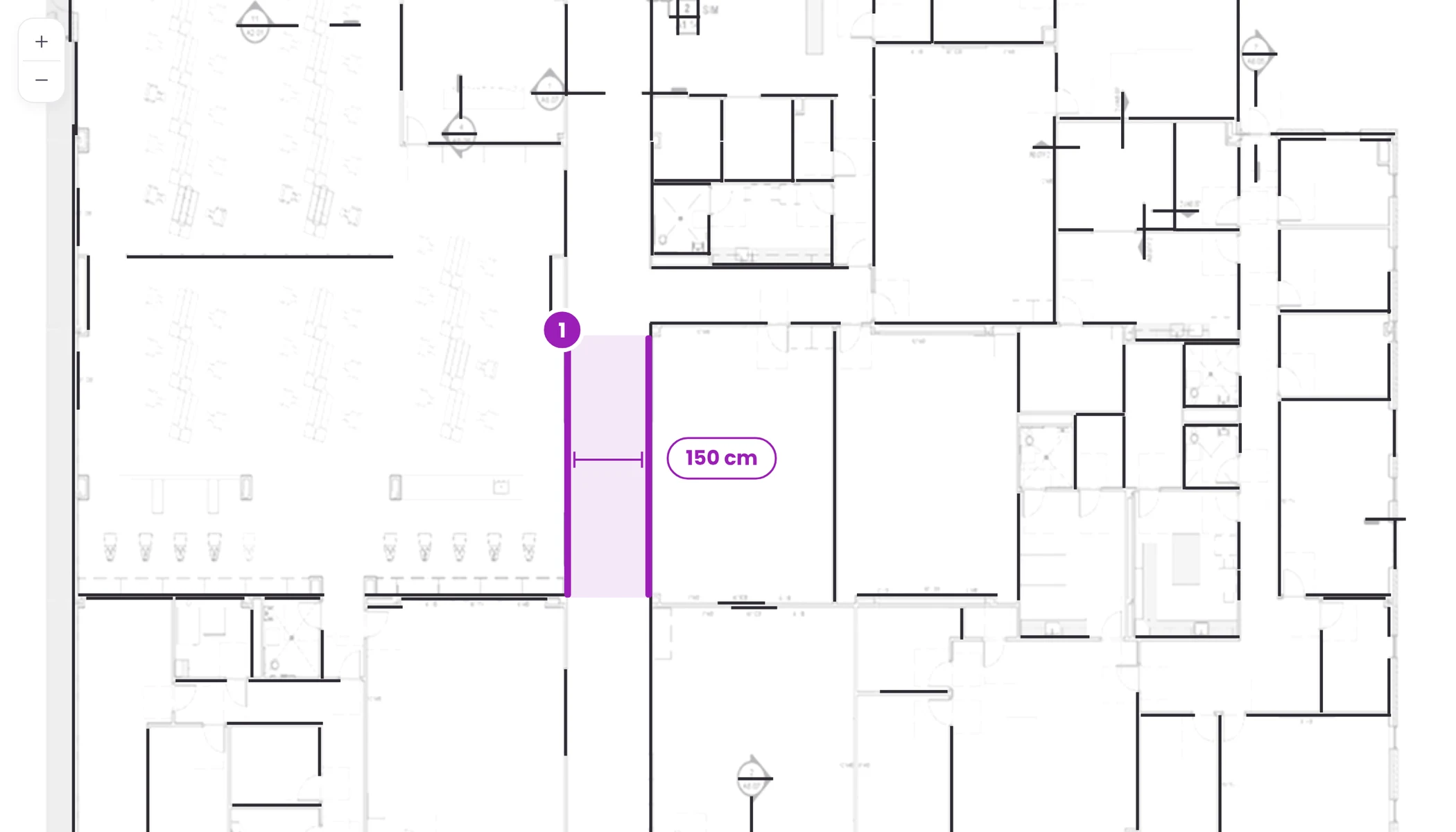
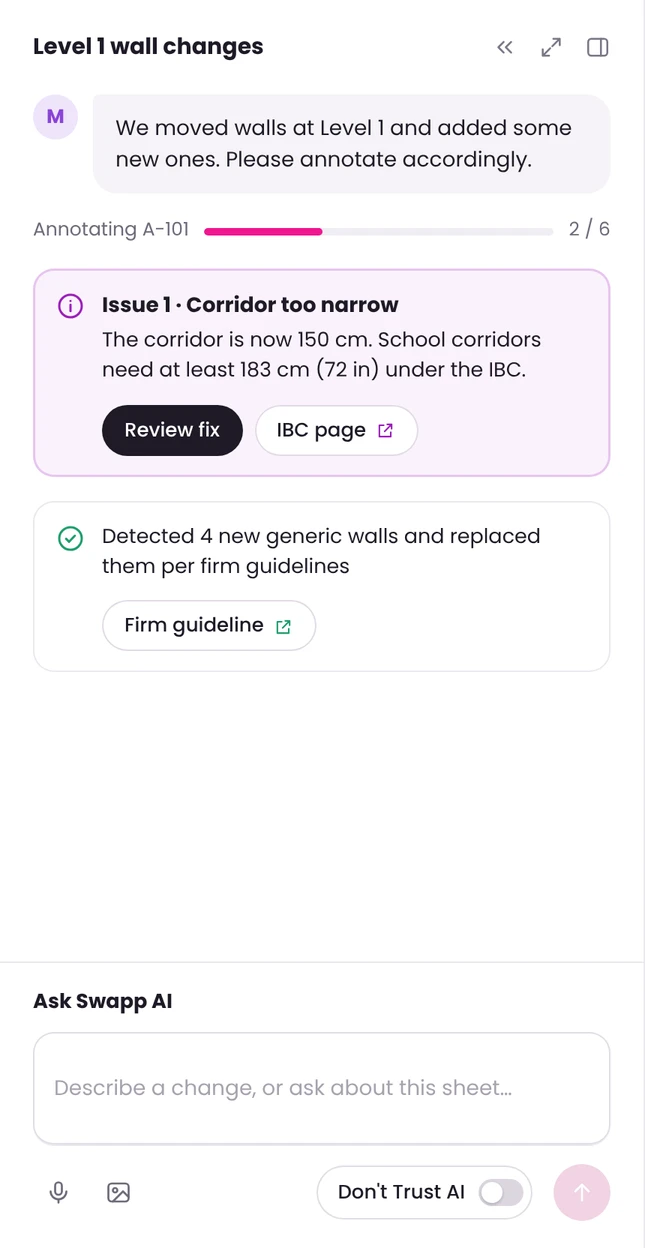
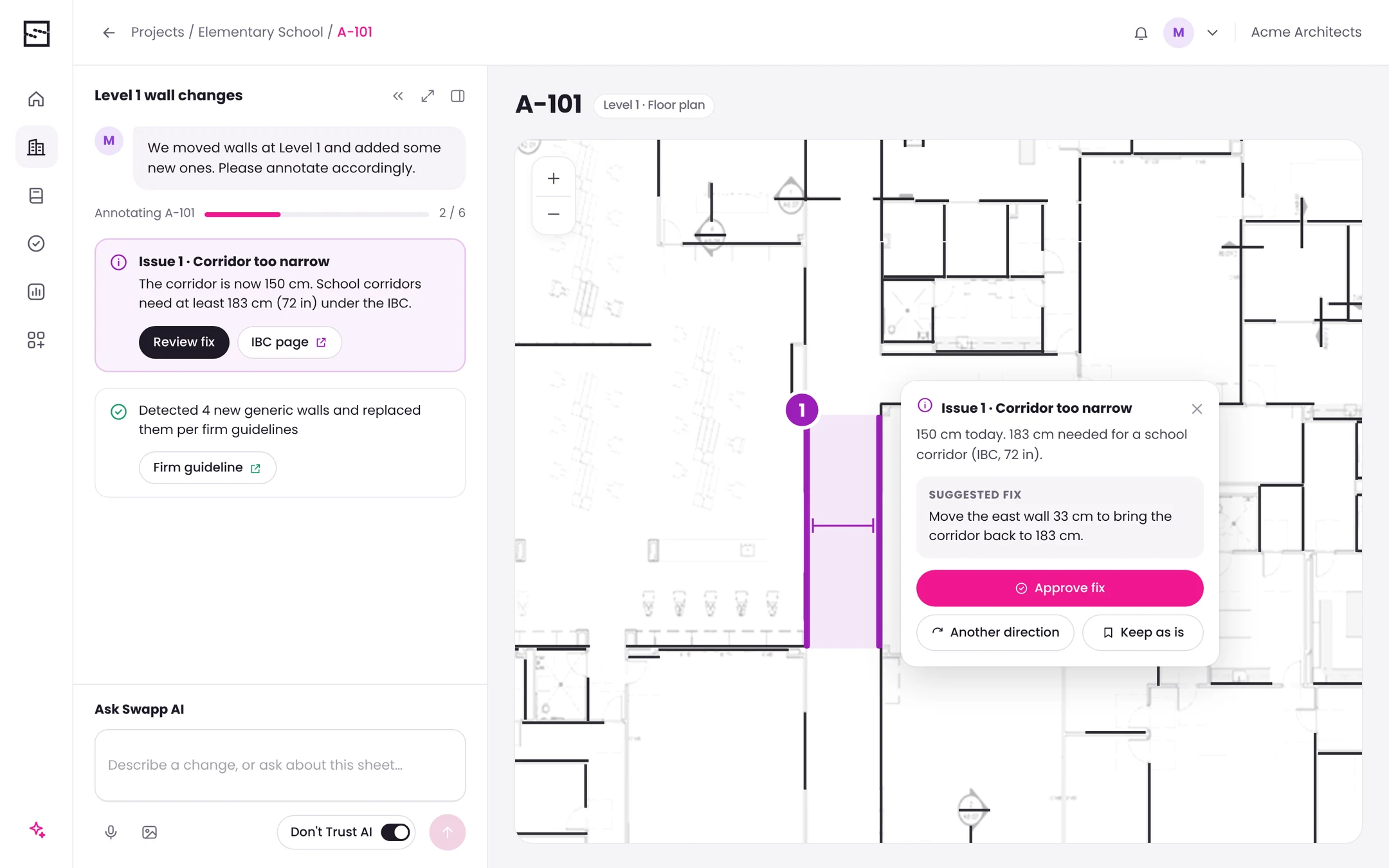
Every issue is explained in words and shown on the plan
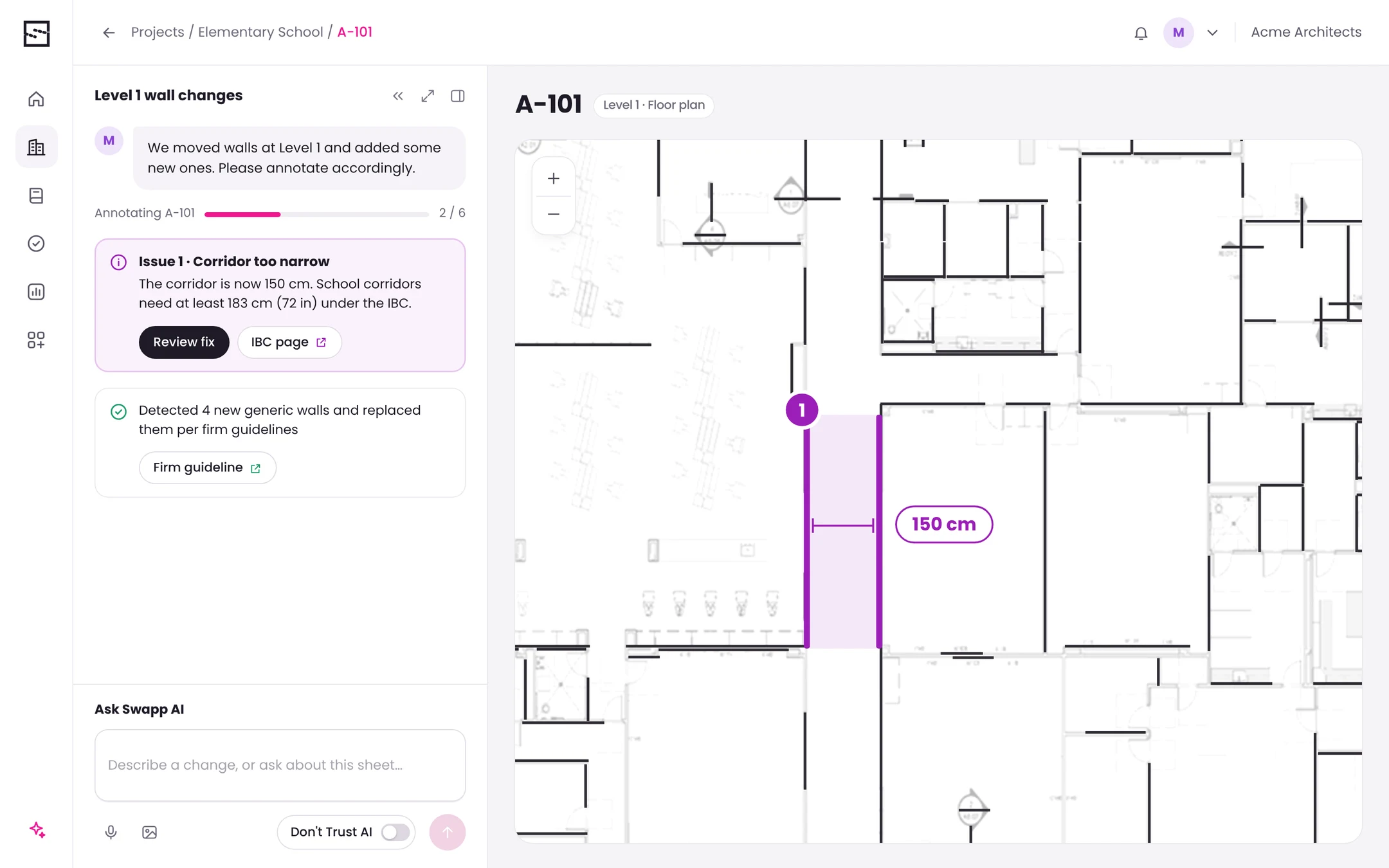
When the assistant finds a problem, the explanation in the chat and the highlight on the plan point to the same place. The architect never has to search for what the AI means.
 12345
- 1Progress you can followThe work is split into steps, so it's clear how far the assistant got.
- 2One number, both sidesIssue 1 in the chat is pin 1 on the plan.
- 3The affected area, highlightedThe walls that cause the problem are marked, not just the room around them.
- 4The measurement, not just the verdictThe actual width sits on the plan, so the architect can check it at a glance.
- 5The rule behind itEvery issue links to its source: the building code, or the firm's own guidelines.
03 · Reviewable decisions
A suggestion, then the architect's call
Opening the issue on the plan shows one concrete fix. Nothing is applied until the architect chooses what happens next.
- 01One concrete suggestionA specific fix in plain words, instead of a list of possibilities to compare.
- 02Nothing changes without approvalApplying the fix is an explicit step, owned by the architect.
- 03Room for professional judgmentThe architect can ask for another direction, or keep the design as is.
Wider impact
Related places, found but not touched
After the first request, the assistant looks for other places with the same or a connected condition. It shows them for review and doesn't apply anything on its own.
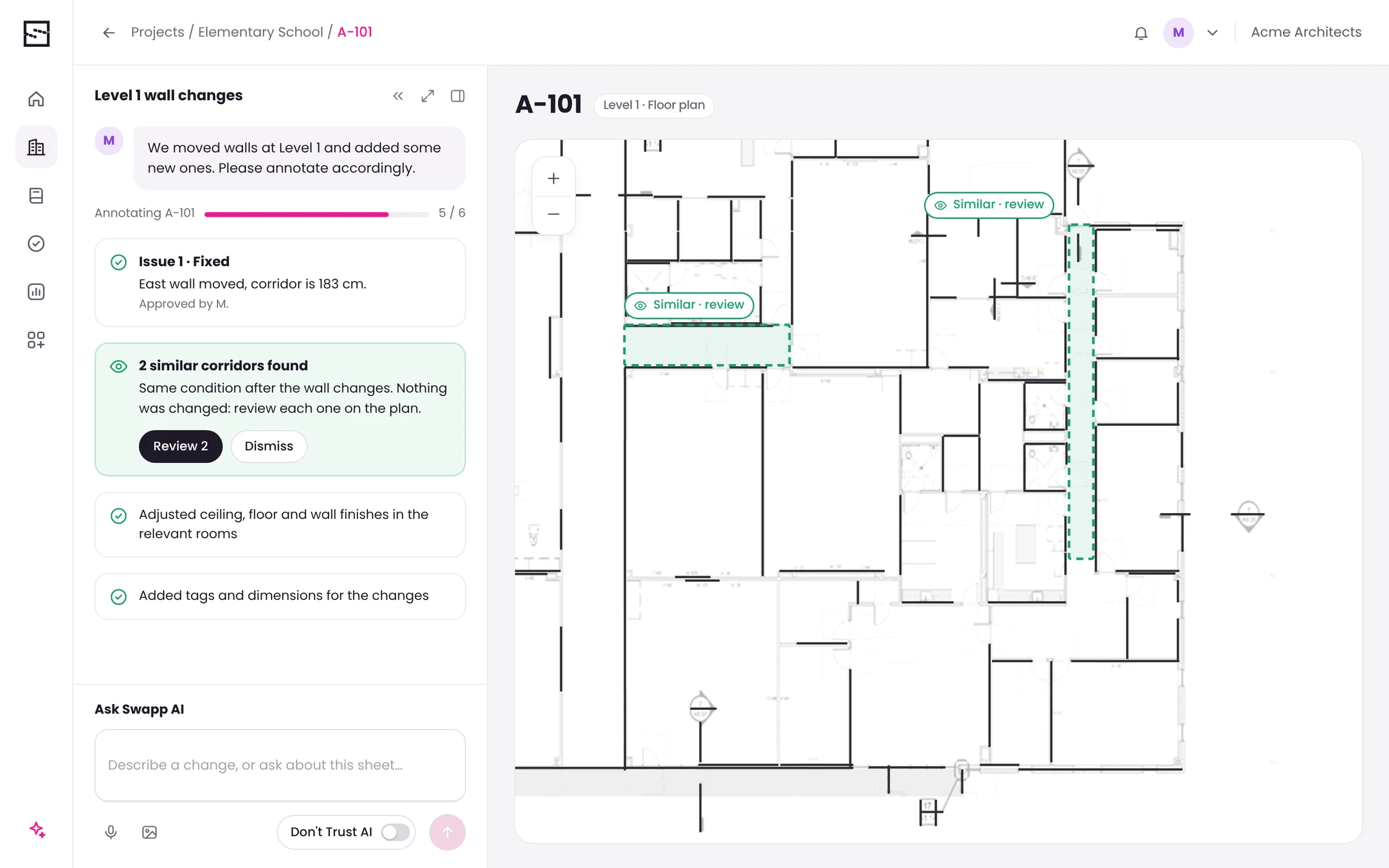 123
- 1Found, not fixedThe assistant reports what it found and says clearly that nothing was changed.
- 2Shown where it isEach related place is outlined on the plan, ready to open and review.
- 3Routine work, listedFinishes, tags and dimensions are updated per firm guidelines, and every step is listed so it can be checked.
Before / after
From manual checks to decisions with context
Before
- Every change checked by hand across drawings and regulations
- Requests treated as commands
- No way to see what the AI understood
- Related places easy to miss
After
- Issues found and explained in context
- A conversation grounded in the open plan
- Every interpretation shown on the plan before acting
- Related places surfaced for review
What I did
- Led the design end to end, as the sole product designer
- Worked every day with in-house architects as domain experts
- Mapped how intent, interpretation, validation and approval connect, before designing screens
- Designed the conversation, the plan highlights and the review and approval flow
- Created reusable patterns for explainable AI: processing states, plan highlights, short reasoning, clarifying questions and approval
The result
One model, from request to approved change.
The product brought natural-language requests, plan context, explainable recommendations, related changes and the architect's approval into a single flow.
- 01Explainability built inEach recommendation links to the request, the place on the plan, the issue and the proposed action.
- 02The architect stays in controlMeaningful changes wait for approval, and every suggestion can be redirected or declined.
- 03Patterns that scaleThe same building blocks repeat across every type of change, so the product can grow.
In high-stakes work, AI earns trust
by showing its reasoning
and leaving the final call to people.
- Ground every answerAnswers tied to the plan on screen were the ones architects trusted.
- Show the reasoning and the doubtVisible reasoning, and honesty about uncertainty, made the AI easier to rely on.
- Leave room to overrideReview moments and a real “no” are part of the design, not an exception.